Run your entire event from start to finish.
Registration, live Q&A, voting, screen management, analytics — everything you need, no other tools required.
Run your entire event from start to finish.
Registration, live Q&A, voting, screen management, analytics — everything you need, no other tools required.
Every event format, covered.
From 50-attendee online seminars to 5,000-person international congresses — Meet2Be scales with you.

Congresses & Conferences
Multi-hall programs, abstract management, parallel sessions, sponsor stands, and live stage control.

Hybrid & Online Events
Unite in-person and remote attendees on one platform — fully interactive hybrid experience with live Q&A, surveys, and keypad polls.

Corporate Summits
Internal all-hands, leadership meetings, and product launches with engagement tools built in.

Academic Symposiums
Paper submission, peer review workflow, CME credits, debate sessions, and certificate management.
From the Live Toolkit
Live Q&A
Control which questions reach the stage
Attendees submit questions from their phone. You review, filter and push only the best ones to the stage screen — instantly. Sessions stay focused; nothing surprises the speaker.
- No spam: every question reviewed before hitting the screen
- One click to push any question to the stage display
- Full session Q&A log exported automatically after the event
Keypad Voting
The whole room votes at once — results on screen in seconds
One tap on any phone, live bar charts appear on stage as votes arrive. Perfect for quick consensus, dramatic reveals or audience warm-ups before the main session.
- Keypad reaches all attendees' phones simultaneously
- Live bar chart pushed to stage screen in real time
- Results appear as votes arrive — no refresh needed
Surveys
Structured feedback without disrupting the flow
Five question types, one submission per attendee, results ready on stage. All response data exported automatically when the session closes.
- 5 question types — star rating to free text to dropdown
- One submission per person, enforced automatically
- All responses exported with a single click
Screen Management
Switch scenes, run timers and manage Q&A from one panel
Speaker slides, countdown timers, Q&A overlays and sponsor visuals — all controlled from a single Operator Board. No dedicated technical crew required.
- Speaker name & session info update automatically on every switch
- Countdown timer keeps every presenter on schedule
- Sponsor visuals rotate automatically between scenes
Live Debate
Structured debates with live audience voting
Teams argue their case while the audience votes in real time. Live percentages update on stage as each vote arrives. The moderator reveals the result at exactly the right moment.
- Audience votes for any team directly from the app
- Live percentages update on stage as each vote arrives
- Results revealed only at the moderator's command
Live Q&A
Hall B
incoming
What is the recommended dosage for first-line patients?
ON SCREENAre there contraindications with beta-blockers?
ON SCREENCan you share subgroup B clinical trial data?
"What is the recommended dosage for first-line patients?"
Live Q&A
What is the recommended washout period?
Keypad Voting
Hall B
Which treatment protocol should be prioritized for Stage II patients?
Keypad Voting
Which treatment protocol should be prioritized for Stage II patients?
Surveys
Results
184
responses
Which first-line agent do you prefer for T2DM with established cardiovascular disease?
Surveys
Which first-line agent do you prefer for T2DM with established cardiovascular disease?
Screen Board
Hall B
On Stage Screen
Dr. Sarah Mitchell
Future of Precision Medicine
14:23
Time Remaining
Prof. Kemal Yıldız
Istanbul Medical University
What is the recommended dosage for first-line patients?
Dr. Mitchell
Are there contraindications with beta-blockers?
Anonymous
Live Debate
Session 3A · Hall B
Which team presented the more convincing arguments?
Live Debate
Team Alpha
Team Beta
From the Live Toolkit
Every engagement tool your event needs
Live Q&A
Control which questions reach the stage
Attendees submit questions from their phone. You review, filter and push only the best ones to the stage screen — instantly. Sessions stay focused; nothing surprises the speaker.
Anonymous Mode
Send to Screen
Real-Time
- No spam: every question reviewed before hitting the screen
- One click to push any question to the stage display
- Full session Q&A log exported automatically after the event
Keypad Voting
The whole room votes at once — results on screen in seconds
One tap on any phone, live bar charts appear on stage as votes arrive. Perfect for quick consensus, dramatic reveals or audience warm-ups before the main session.
Any Device
Live Charts
Instant Results
- Keypad reaches all attendees' phones simultaneously
- Live bar chart pushed to stage screen in real time
- Results appear as votes arrive — no refresh needed
Surveys
Structured feedback without disrupting the flow
Five question types, one submission per attendee, results ready on stage. All response data exported automatically when the session closes.
5 Question Types
Live Results
Download Report
- 5 question types — star rating to free text to dropdown
- One submission per person, enforced automatically
- All responses exported with a single click
Screen Management
Switch scenes, run timers and manage Q&A from one panel
Speaker slides, countdown timers, Q&A overlays and sponsor visuals — all controlled from a single Operator Board. No dedicated technical crew required.
Scene Layout
Countdown Timer
Single Panel
- Speaker name & session info update automatically on every switch
- Countdown timer keeps every presenter on schedule
- Sponsor visuals rotate automatically between scenes
Live Debate
Structured debates with live audience voting
Teams argue their case while the audience votes in real time. Live percentages update on stage as each vote arrives. The moderator reveals the result at exactly the right moment.
Team Mode
Live Voting
Result Reveal
- Audience votes for any team directly from the app
- Live percentages update on stage as each vote arrives
- Results revealed only at the moderator's command
Built for the way events actually run
One platform to set up, operate and analyze — so your team can focus on the event, not the tools.
 Operator Board
PRO
Operator Board
PRO
Session 3 — Dr. Ayse Kara
AI in Modern Medicine · Hall A
How does AI compare to traditional methods?
What about data privacy in clinical trials?
Can this scale to multi-site research?
Dr. Ayse Kara
AI in Modern Medicine
Built for real operations
Take full control of your live event
The Operator Board is your live command center. See every incoming question, launch polls, switch stage screens, monitor hall activity, and manage sponsor stands — all within a single purpose-built operator interface. Nothing slips through.
Multi-Hall Dashboard
Dr. Ayse Kara
AI in Medicine
Prof. Yilmaz
08:42
remaining
Dr. Chen · Gene Therapy
Best dosage for stage II?
Any contraindications?
Dr. Muller
Coffee Break
12 min left
Unlimited halls
Five halls running in parallel — zero chaos
Assign sessions to halls, run independent stage screens per track, manage separate Q&A queues, and watch every hall from a single dashboard. Meet2Be scales to the largest international congresses without adding complexity to your team.

Scan to join the event
Attendee experience
Attendees are in the room in under 10 seconds
No new accounts. One download, instant access. Participants open the Meet2Be app, scan your event QR code and instantly access Q&A, polls, the full program, and speaker documents. Higher engagement starts with ease of access — and your participation rates prove it.
Up and running in hours, not weeks.
No onboarding calls required. Set up your event, invite your team, go live.
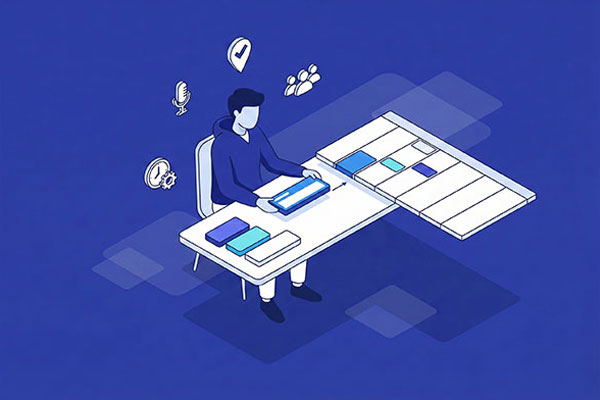
Create
Define halls, programs and sessions. Assign the modules you need. Upload speakers and documents — all from one dashboard.
- Halls, programs & sessions
- Speaker & document upload
- Module assignment per event

Engage
Participants download the Meet2Be app and join your event with a single QR scan. No registration, no separate account needed.
- QR code join — fast & easy
- iOS & Android app
- Works offline for program

Analyze
View real-time engagement data, session attendance, Q&A logs, and satisfaction scores — all in one exportable report.
- Real-time engagement metrics
- Per-session attendance logs
- One-click export (PDF / XLS)
Free Download
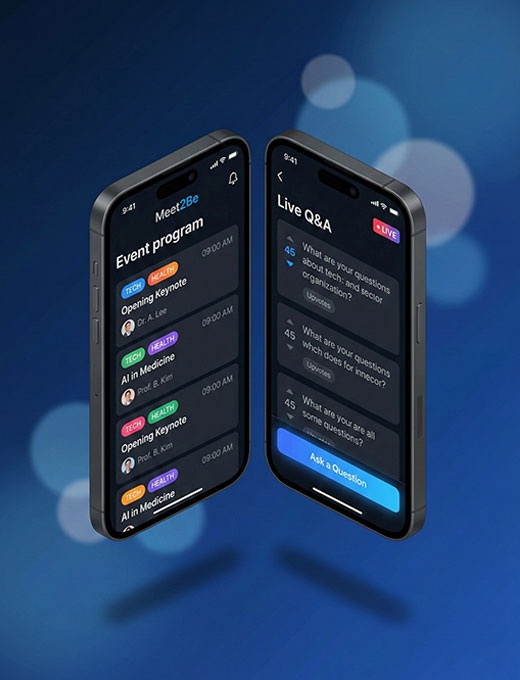
Everything they need, in one app.
Participants download Meet2Be once — then join any event with a QR code. No new account, no learning curve, no barriers.
-
No account needed
-
Scan the QR code and join in seconds
-
Live program & session alerts
-
Q&A, voting & surveys in-app
Free Download
Everything they need, in one app.
Participants download Meet2Be once — then join any event with a QR code. No new account, no learning curve, no barriers.
Your best event starts here.
Hundreds of organizers trust Meet2Be to run congresses, webinars and corporate events that attendees remember. Set up in minutes. Cancel anytime.
No onboarding call. Cancel anytime. Live in minutes.